The Best Habit Tracker Apps to Actually Stick With
Updated on 17 Jun 2026 • 14 min read • posted by Tania
You downloaded a habit tracker a few months ago. Set up eight habits on a Sunday evening — workouts, water, journaling, early bedtime. Checked it for four days, missed a day, felt bad, opened it twice more that week, then forgot it existed. Eventually you deleted it.
If that sounds familiar, you're not the problem. Most people cycle through three or four trackers before one actually sticks — usually because the app asked for more than the habit did. The research is clear that tracking itself works: a meta-analysis of 138 studies in Psychological Bulletin found that people who monitored their progress hit their goals noticeably more often than people who didn't. So the real question isn't whether habit tracking works. It's which tool you'll still be opening on day 47.

Below you'll find a quick comparison of the 10 apps we recommend in 2026, a full review of each one — including free picks, ADHD-friendly options, and the best tools for iOS, Android, and cross-platform use — plus a short research section at the end for anyone who wants the why.
Quick Comparison: The Best Habit Tracker Apps in 2026
| App | Best for | Platforms | Free tier | Price |
|---|---|---|---|---|
| Streaks | iOS purists | iOS, iPadOS, macOS, watchOS, visionOS | No | $4.99 one-time |
| Habitify | Cross-platform power users | iOS, Android, Web, macOS, Apple Watch | Yes | $4.99/mo · ~$30/yr · $64.99 lifetime |
| TickTick | All-in-one (tasks + habits) | iOS, Android, Web, macOS, Windows | Yes | ~$35.99/yr Premium |
| Loop Habit Tracker | Free, open-source, privacy | Android, F-Droid | Yes (full) | Free |
| Finch | ADHD, anxiety, self-compassion | iOS, Android | Yes | $29.99/yr Premium |
| Habitica | Gamification fans | iOS, Android, Web | Yes | $4.99/mo → $47.99/yr |
| Productive | Guided programs and prompts | iOS, Android | Yes | $3.99/mo · $29.99/yr |
| HabitShare | Accountability with friends | iOS, Android | Yes (full) | Free |
| (Not Boring) Habits | Minimalist, beautiful design | iOS only | No | $15/yr solo · $30/yr bundle of 5 |
| HabitNow | Android, no subscriptions | Android | Yes (7 habits) | ~$10 one-time Premium |
What Is a Habit Tracker?
A habit tracker is a tool — analog or digital — that records whether you completed a chosen behavior on a given day, so you can see your consistency over time. That's it. The power isn't in the tool; it's in the act of recording, which forces a daily decision and turns an invisible behavior into a visible streak.
Trackers take many forms: a printed habit tracker template, a bullet journal grid, a spreadsheet, or a dedicated app. This guide focuses on apps, because they add reminders, cross-device sync, and analytics that paper can't match. If you want to understand habit formation itself first, read how to form a habit that sticks.
Paper vs. App: Which Habit Tracker Should You Use?
Use an app if you need reminders, cross-device sync, or progress data you can read back later; stick with paper if you track three habits or fewer and the act of writing keeps you engaged. That's the short version — here's the longer one.
Paper has real advantages. There's no notification to swipe away, no battery to die, and the small friction of drawing the grid yourself makes the commitment feel deliberate. A bullet journal spread or a printed sheet sits open on your desk as a physical cue you can't close in a tab. The catch: paper can't remind you at 11 p.m., can't sync to your phone, and can't show you a six-month trend without you building the chart by hand.
Apps win on exactly those points — reminders fired the moment you decide and streaks counted automatically, plus analytics that surface patterns ("you skip the gym every Thursday") you'd never spot in a paper grid. The trade-off is that the tracker lives on the same phone that's full of distractions.
| Criteria | Paper | App |
|---|---|---|
| Reminders | None — you have to remember | Push notifications at set times |
| Syncing | One physical location | All devices, cloud backup |
| Analytics | Manual, if at all | Automatic streaks, trends, charts |
| Friction | Higher — deliberate by design | Lower — one tap |
| Distraction risk | Zero | The phone it lives on |
| Best for | 1–3 habits, ritual lovers | 4+ habits, reminder-dependent |
For most people building more than two or three habits, an app's reminders and automatic sync outweigh paper's tactile charm. If you track one core habit and love the ritual of pen on paper, start there — plenty of people run both, journaling by hand while an app handles the nudge.
How We Chose These Apps
Reddit's r/productivity consensus is accurate on this: the best habit tracker is the one you don't abandon. We filtered with that in mind:
- Actively maintained in 2025–2026 — apps with recent updates, responsive developers, and no major billing complaints.
- A clear reason to exist — each pick does one thing better than the others (platform integration, privacy, accountability, ADHD-friendly design, price model).
- Real use cases, not feature lists — we favored apps people stick with over apps that list 40 features and get uninstalled in a week.
- Honest pricing — we flagged subscription bloat and surfaced the one-time purchase options.
The 10 Best Habit Tracker Apps in 2026
1. Streaks — Best for iOS
Streaks is the closest thing the habit-tracking space has to a default pick for Apple users. It's an Apple Design Award winner, costs $4.99 once with no subscriptions, and runs natively on iPhone, iPad, Apple Watch, Mac, and Vision Pro.
The model is a 24-habit grid: each tile is one habit, tap to complete, the streak counts consecutive days. You can tie tasks to Apple Health data (e.g., "walk 8,000 steps" completes automatically), create negative habits you're trying to avoid, and sync everything across devices via iCloud.
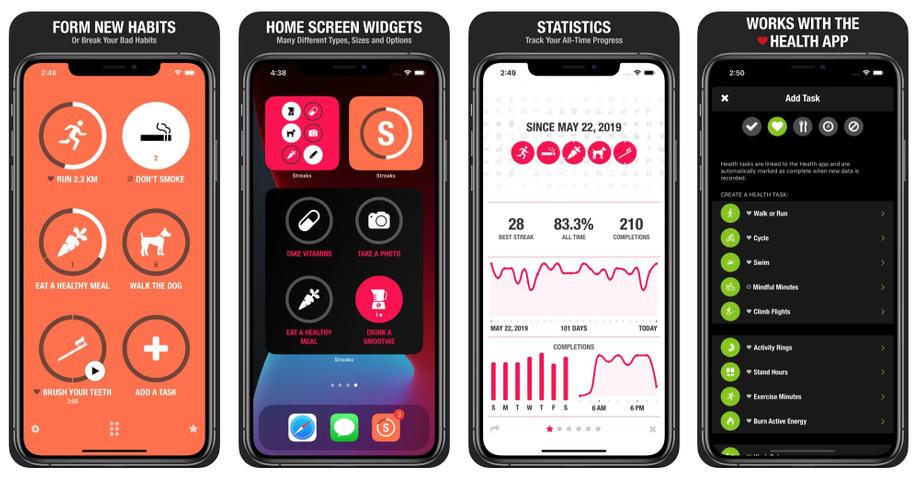
Strengths: One-time purchase. Apple Health integration. Clean design. Widgets and watch complications. Limits: iOS-only. Hard cap of 24 habits (which is actually a feature — see the Common Mistakes section). Price: $4.99 one-time.
2. Habitify — Best Cross-Platform
If you split your life between an Android phone, a work laptop, and a personal Mac, Habitify is the most capable pick. It syncs across iOS, Android, web, macOS, and Apple Watch, and added Zapier and IFTTT automations that let you trigger habits from other apps — complete a Toggl time block, check off "deep work" automatically.
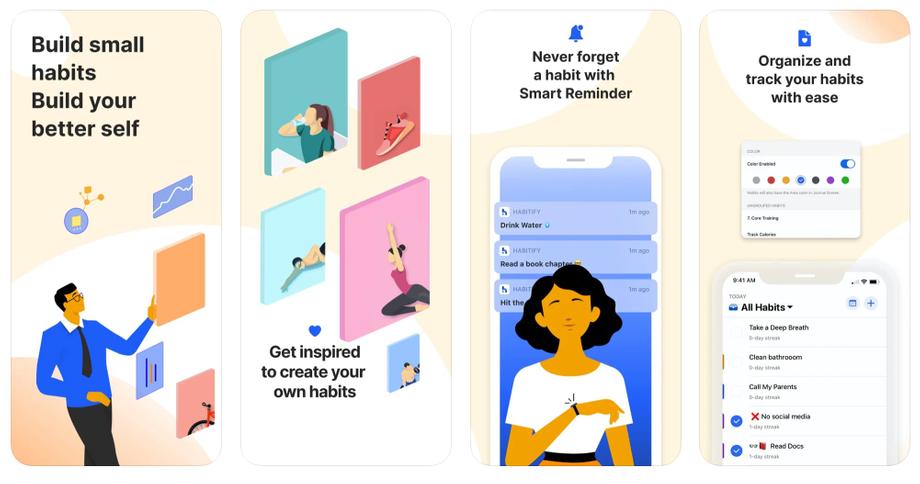
Strengths: True cross-platform. Smart reminders. Strong analytics. Lifetime option caps the cost. Limits: Free tier is capped at 3 habits. The analytics can encourage over-optimization. Price: Free tier; Premium $4.99/mo, ~$30/yr, or $64.99 lifetime.
3. TickTick — Best All-in-One
TickTick is a task manager with a built-in habit tracker, Pomodoro timer, and calendar. It's the right pick if you want one app instead of three — tasks in the morning, a habit tick-off at night, a focus session in between. The habit module is free even on the basic plan, which is rare.
If you already use the Pomodoro technique or practice time blocking, TickTick slots cleanly into that workflow.
Strengths: One app for tasks, habits, calendar, and focus timer. Clean UI. Generous free tier. Limits: The habit tracker is good but not specialized — no gamification, simpler analytics than Habitify. Price: Free tier includes habits; Premium ~$35.99/yr unlocks advanced filters and calendar views.
4. Loop Habit Tracker — Best Free / Open-Source
Loop is the answer when you want a habit tracker that respects your data. It's open-source (GPLv3), ad-free, account-free, and stores everything on your device. The UI is unfussy — a list of habits, a checkmark grid, strength-over-time graphs. Available on Google Play and F-Droid.
Reddit's r/ADHD and r/PrivacyTools both recommend it heavily. It's Android-only, which is the one catch.
Strengths: Completely free. No account. No ads. Works offline. Exports to CSV. Limits: Android only. No social features or gamification. Price: Free, forever.
5. Finch — Best for ADHD and Self-Compassion
Finch wraps habit tracking inside a virtual pet — a small bird that grows and explores when you complete self-care goals. That sounds gimmicky until you read the reviews: 4.9 stars from 325,000+ ratings, and a massive following in r/ADHD and r/anxiety communities.
The differentiator is tone. Most trackers punish you for missing a day (streak resets, shaming graphs). Finch does the opposite — missed days get a gentle check-in, the pet doesn't die, and the goal structure rewards showing up rather than perfection. That matters a lot if you've abandoned five trackers already because one bad week nuked the streak.
Strengths: Non-punishing design. Self-care framing (not just productivity). Journaling and mood tracking included. Limits: The pet aesthetic isn't for everyone. Premium unlocks the best features. Price: Free tier; Premium $29.99/yr.
6. Habitica — Best Gamified Tracker
Habitica turns your habits into a role-playing game. You build a pixel-art avatar, earn gold and XP for completing habits, lose HP when you skip them, and fight monsters with a party of friends. If RPG mechanics motivate you, nothing else in the space comes close.
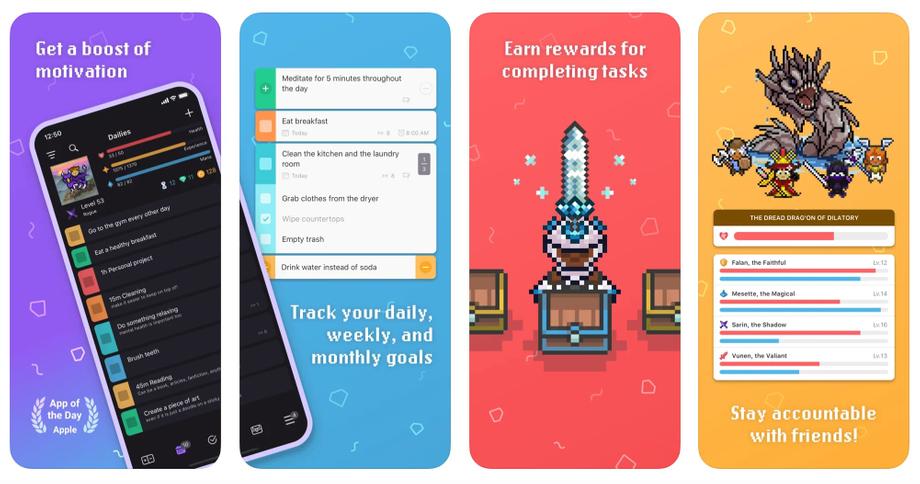
Strengths: Party play keeps you accountable. Free tier is genuinely usable. Hugely customizable. Limits: UI feels cluttered on first use. Mechanics take a week to understand. Price: Free tier; Premium $4.99/mo up to $47.99/yr; group plan $9/mo + $3 per member.
7. Productive — Best for Guided Programs
Productive is a habit builder with a coaching layer on top. Beyond tracking, it offers structured programs (morning routines, reading habits, fitness blocks), daily reflection prompts, and a library of behavioral-science articles built into the app. Useful if you want a tracker that teaches as well as records.
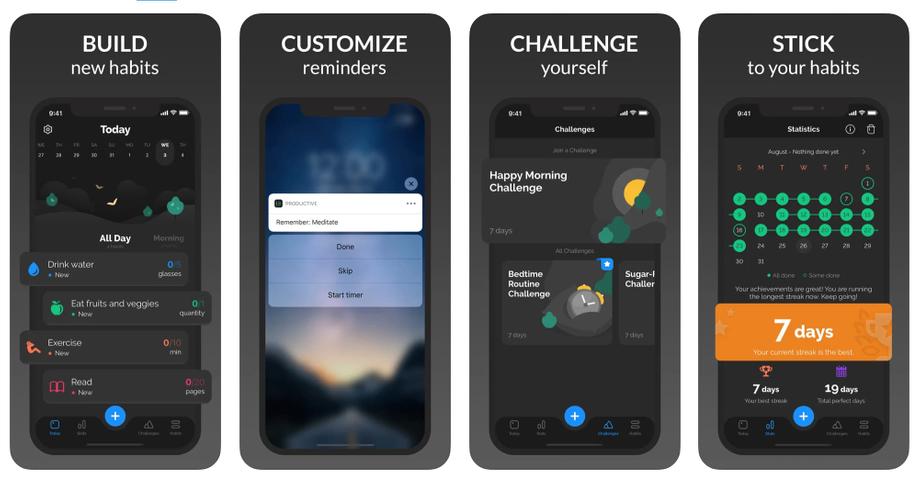
Strengths: Daily prompts and reflection check-ins. Guided challenges. ADHD-friendly features. Limits: Coaching content is light in places. Feature set overlaps with premium competitors. Price: Free tier; Premium $3.99/mo or $29.99/yr.
8. HabitShare — Best for Accountability
HabitShare lets you share specific habits with selected friends while keeping the rest private. Your gym buddy sees your workout habit; they don't see your journaling or meditation. Friends can comment, react, and send GIFs, which turns adherence into something social instead of solitary.
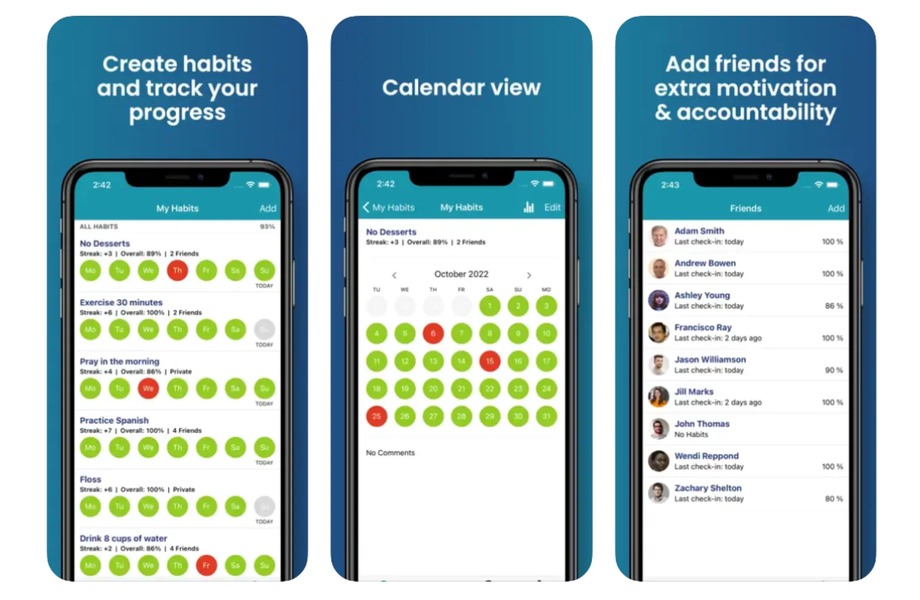
Strengths: Free, no ads. Granular privacy controls. Friendly, non-judgmental tone. Limits: Basic analytics. Less polished than paid competitors. Price: Free.
9. (Not Boring) Habits — Best for Minimalist Design
Andy Works built (Not Boring) Habits around a single idea: do a habit 60 times, total — consecutive or not. Miss a day, it doesn't matter. The focus is total reps, not streak integrity, which removes a lot of the anxiety around day-one recovery.
The 2026 update ("Habits 2026") added iOS 26 Liquid Glass rendering and on-device AI for personalized habit suggestions — notable because it runs locally with no data leaving the device. If you value design and privacy together, it's the nicest-looking tracker in the list.
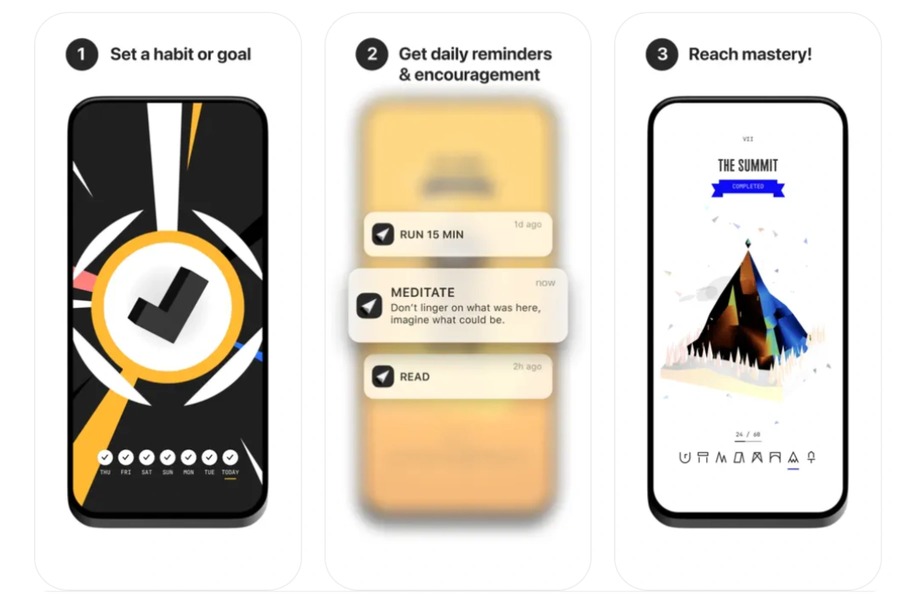
Strengths: Beautiful UI. Privacy-first (on-device AI). Bundle price covers four other Not Boring apps. Limits: iOS only. Subscription-only. Price: $15/yr solo, $30/yr for the five-app bundle.
10. HabitNow — Best Android One-Time Purchase
HabitNow is the Android answer to Streaks: pay once, own it, no subscription. It combines habit tracking with a to-do list, Pomodoro timer, and calendar — closer to TickTick than a pure tracker. The 4.7 Play Store rating reflects the no-subscription goodwill.
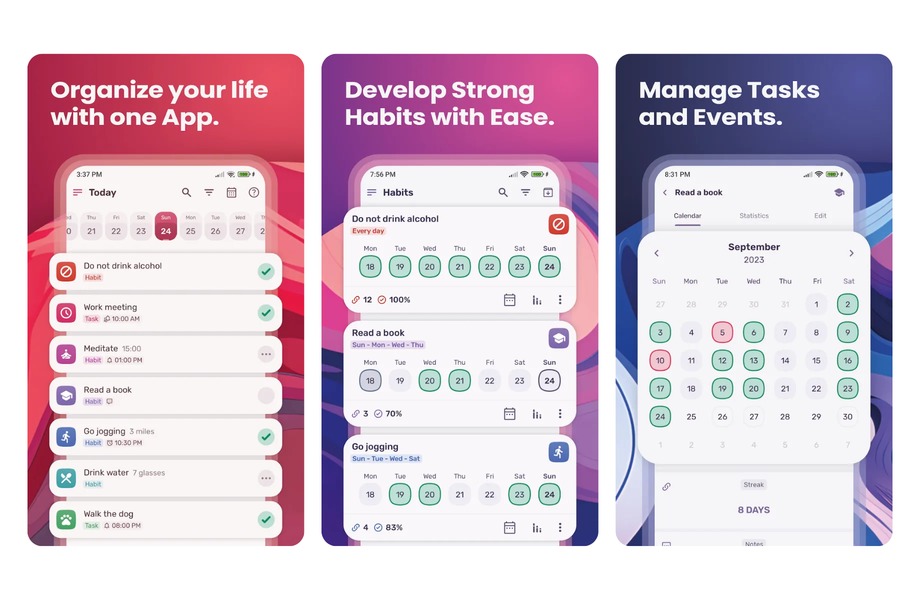
Strengths: One-time purchase unlocks everything. Home-screen widgets. Tasks + habits combined. Limits: Android only. Design isn't as polished as the iOS-first apps. Price: Free for up to 7 habits; ~$10 one-time Premium.
A Few We Left Off (and Why)
Three names come up often and didn't make the main list. Atoms, the official app from Atomic Habits author James Clear, launched in 2024 and pairs tracking with bite-sized lessons pulled straight from the book — a strong pick if you want Clear's "make it obvious, make it easy" system built in, though it leans more coach than tracker and the free tier is limited. Way of Life is a long-running iOS and Android tracker with sharp trend charts; it lost its spot mainly because the free tier caps at three habits and the interface is starting to show its age. Routinery is built around timed routines — a guided morning or wind-down sequence rather than a simple daily tick — which is ideal if you want structure and overkill if you just want to check a box.
How to Choose the Right Habit Tracker for You
Feature lists won't tell you which app you'll open on day 47. Four questions will:
1. Which ecosystem do you actually live in?
If you're all-Apple, Streaks or (Not Boring) Habits. All-Android on a budget, Loop or HabitNow. Split across devices, Habitify or TickTick. This single question rules out half the list.
2. Do you want a tracker, or a system?
A pure tracker (Streaks, Loop, HabitShare) does one thing and gets out of the way. A system (TickTick, HabitNow, Productive) combines habits with tasks, calendar, or coaching. Pick "system" only if you're already using one — otherwise the extra surface area becomes another thing to maintain.
3. How do you respond to streaks breaking?
If a broken streak sends you into a spiral, pick an app that de-emphasizes perfection — Finch, (Not Boring) Habits, or Loop. If loss aversion genuinely motivates you, the streak-focused apps (Streaks, Habitica) work exactly because you don't want to lose the run.
4. What's your relationship with subscriptions?
Streaks, HabitNow, and Loop are one-time or free forever. Habitify offers a lifetime tier. Everything else is a subscription, which compounds fast if you already pay for Notion, Todoist, and a gym.
A good default: Streaks on iOS, Loop on Android, TickTick if you're cross-platform and don't have a task manager already.
How to Set Up a Habit Tracker You'll Actually Use
Picking the right app is half the job. The other half is setup — and it's where most people go wrong, loading in eight habits during a burst of New Year's-resolution motivation and dropping all of them by week two. These five steps come straight from behavioral science, and the whole thing takes about ten minutes.
1. Start with two keystone habits, not eight
Choose the one or two habits that drag others along with them — a workout, an earlier bedtime, a five-minute morning plan. Charles Duhigg called these "keystone habits" because they set off a chain reaction: people who start exercising tend to eat better and waste less time without consciously deciding to. Two habits you keep beat eight you abandon. Add a third only once the first two have run for 30 days.
2. Stack each habit onto a routine you already have
Anchor the new behavior to something you already do daily, using James Clear's habit stacking formula: "After I [current habit], I will [new habit]." After I pour my morning coffee, I meditate for two minutes. The existing routine is already wired into your brain, so it supplies the cue — your tracker just confirms a behavior that already has a trigger instead of nagging you to invent one. Our habit stacking guide covers how to pick an anchor that holds.
3. Shrink it to a two-minute version
Scale the habit down until starting takes two minutes or less — "read one page," not "read for 30 minutes"; "put on running shoes," not "run 5K." This is Clear's Two-Minute Rule, and it works because the hardest part of any habit is showing up; once you've started, continuing is easy. Track the two-minute version, and a checked box for "one page" keeps the streak alive on the days motivation has left the building.
4. Write one if-then reminder for each habit
Set the tracker's reminder to fire at a specific moment and tie it to a plan, not just a clock: "If it's 7 a.m. and the coffee's brewing, then I meditate." Psychologists call these implementation intentions, and a 2006 meta-analysis by Peter Gollwitzer and Paschal Sheeran, pooling 94 studies, found that spelling out the when, where, and how of a behavior raised follow-through with a medium-to-large effect (d = 0.65). One well-placed prompt beats six random pings.
5. Book a five-minute weekly review
Once a week, open the app and actually read the grid — not to flog yourself over a missed day, but to catch the pattern (Thursdays are always a miss; weekends are solid). The entire point of tracking is making an invisible behavior visible, and that only pays off if you look. Change one thing for next week, then close the app.
Common Mistakes When Using a Habit Tracker
Most habit trackers don't fail because of the app. They fail because of how the app is used. These are the patterns that show up on r/productivity and r/getdisciplined every week:
- Tracking too many habits at once. Setting up 12 habits on day one is the surest way to abandon by day nine. Start with 2–3. Add a fourth only after one of the first three has hit the 30-day mark. The hard cap in Streaks and (Not Boring) Habits is a feature, not a limitation.
- Streak anxiety. Missing day 15 of a 30-day run makes people delete the app rather than re-start. Use James Clear's "never miss twice" rule — one missed day is an accident, two is a pattern. Apps like Finch and (Not Boring) Habits bake this forgiveness into the design.
- Tracking outcomes instead of actions. "Lose 10 lbs" isn't trackable daily. "Walk 30 minutes after dinner" is. Trackers reward inputs you control, not outputs you partially influence. If the habit feels like a wish, reframe it as a SMART goal and track the weekly action.
- Notification overload. A tracker that pings you six times a day stops being useful and becomes background noise. Keep reminders to your two most important habits and a single end-of-day check-in — the same digital minimalism you'd apply to social apps belongs on the one app meant to help you.
- App-hopping. Switching trackers every three weeks resets all your data and hides the progress the tracker is supposed to make visible. Pick one, commit for 60 days, then reassess. Most of the value is in the continuity, not the features.
Why Habit Tracking Works (the Research)
If you've read this far, you're probably already sold on trying a tracker. But it's worth knowing why it works — because the mechanism shapes how you should use the app.
The 66-Day Reality (Not 21)
The "21 days to form a habit" claim traces back to a 1960 book by plastic surgeon Maxwell Maltz, who observed that his patients took about 21 days to adjust to a new nose. It has no basis in habit science. The actual number comes from a study by Phillippa Lally at University College London, published in the European Journal of Social Psychology in 2010. Lally and colleagues tracked 96 volunteers adopting new daily habits and found that automaticity took an average of 66 days — with a range from 18 to 254, depending on the habit's complexity.
That range matters. Drinking a glass of water at breakfast stabilizes in a few weeks. Running daily takes closer to nine months. A tracker keeps you honest through that long middle stretch, when motivation runs out and the habit hasn't yet become automatic.
Monitoring Closes the Intention–Action Gap
The Harkin et al. meta-analysis referenced in the intro isn't a single study — it's a synthesis of 138 experiments across nearly 20,000 people. The finding is clean: prompting someone to monitor their progress toward a goal raised goal attainment by about d = 0.40. Effects were larger when the monitoring was physically recorded (not just mentally noted) and when the record was visible to the person later.
In plain terms, the act of marking a box makes you more likely to do the thing again tomorrow. That's the mechanism a habit tracker operationalizes.
The Streak Effect
Streaks exploit a well-documented quirk of motivation: loss aversion. Breaking a 30-day streak feels more painful than the small reward of extending it by one day. Duolingo's internal data shows users who reach a 7-day streak are 3.6× more likely to stay engaged long-term, and their "Streak Freeze" feature cut churn by 21% for at-risk users.
The Fogg Behavior Model — B = MAP (Motivation × Ability × Prompt), developed at the Stanford Behavior Design Lab — explains why: a tracker provides the prompt (notification, home-screen widget) at the moment when ability is high, and the streak adds motivation you didn't have to generate from scratch.
When Tracking Backfires
The same loss aversion that powers a streak can turn on you. Break a long run and the tracker can set off an all-or-nothing collapse — the "I've already blown it, might as well quit" spiral that dieting researchers Janet Polivy and Peter Herman named the what-the-hell effect. Heavy analytics cut the same way: when the number becomes the goal, people start gaming the box instead of doing the habit, ticking "exercised" for a stretch that doesn't move anything. The evidence here is softer than the case for tracking itself — it's a pattern reported widely more than it's been measured in one clean study — but the fix is simple. Treat the record as feedback, not a verdict, and aim for consistency over a flawless grid.
James Clear's habit tracker guide adds one rule worth memorizing: never miss twice. One missed day is an accident. Two in a row is the start of a new pattern. The best trackers make day-two recovery easy instead of punishing.
Start Tracking Today
The research says you don't need the perfect app — you need a visible record that nudges you to show up. Pick one tracker from the list above that matches your platform and your tolerance for streaks. Set up two habits. Open the app tomorrow morning. That's the whole protocol.
If you want to go deeper, read how to form a habit that sticks for the formation side, or grab a printable habit tracker template if you'd rather start on paper. Both pair cleanly with any app above.
Frequently Asked Questions
How long does it take to form a habit?
A median of 66 days, not 21. Phillippa Lally's 2010 UCL study tracked 96 volunteers, with a range from 18 days for a simple habit (a glass of water at breakfast) to 254 for a complex one (running every day). The 21-day figure comes from a 1960 self-help book and has no grounding in habit science. Our guide on how to build a habit covers what that timeline means in practice.
Do habit trackers actually work?
Yes, with evidence. A 2016 meta-analysis of 138 studies in Psychological Bulletin found that monitoring progress toward a goal increased goal attainment with an average effect size of d = 0.40. Recording something physically (ticking a box, marking a day) had a larger effect than just mentally noting it, which is exactly what a tracker enforces.
What's the best free habit tracker?
Loop Habit Tracker on Android (fully free, open-source, no account required) and HabitShare on both platforms (free with accountability features) are the strongest picks. TickTick's free tier also includes the habit module without restrictions, which makes it the best free cross-platform option.
What's the best habit tracker for ADHD?
Finch is the most-recommended pick in r/ADHD and r/anxiety communities — its non-punishing design and self-care framing avoid the shame spiral that kills most tracking attempts. Productive and Loop also work well because of their flexibility and low friction. Avoid trackers that reset hard on missed days if streak-breaking pushes you to quit.
How many habits should I track at once?
Two or three to start. More than that and you'll drop all of them inside two weeks. Once one habit has been consistent for 30 days, you can add a fourth. James Clear recommends stacking a new habit onto an existing one ("after I pour my morning coffee, I meditate for two minutes") instead of starting from scratch — easier to maintain, easier to track.
Is it better to track habits on paper or in an app?
An app suits most people because it adds reminders, automatic streaks, and cross-device sync that paper can't match. Paper is the better pick if you track three habits or fewer and the ritual of writing by hand keeps you showing up — it has zero notification noise and no distraction risk. Plenty of people run both: a printed sheet or bullet journal for reflection, an app for the daily nudge.


