Organize Your Thoughts with Best Mind Mapping Software
Updated on 31 Mar 2026 • 7 min read
To capture your ideas and turn them into tangible products, mind mapping software is a must. During the brainstorming process, ideas happen quickly, and if not appropriately tracked, can become overwhelming.
There are many reasons that mind map software is the best solution for this. To fully understand the benefit it can provide to your organization, it’s best to explore the concept of mind mapping and how it helps bring projects to life.

Best Mind Mapping Apps
- For collaborative brainstorming: FigJam
- For working remotely: Mural
- For personal brainstorming: XMind
- For project planning: Mind Meister
- For AI-powered innovation workspace: Miro
- For minimalist interface lovers: Mindmup
- For creating clear and concise mind maps: Coggle.it
- For fast AI-generated mind maps: Whimsical
- For turning any content into a mind map: Mapify
Concept of Mind Mapping
The concept of mind mapping stems from extracting useful ideas and developing links between them. During the brainstorming process ideas flow freely, but sometimes connections are not immediately noticeable. This makes the process of putting these ideas together and creating plan for an entire project extremely difficult. This is where mind mapping plays a critical role.
The best way to describe a mind map is a hierarchical tree is it shows a natural progression between ideas. A mind map separates a project into modular components and then breaks those down into even more specific tasks.
What is Mind Mapping Software
Although mind-mapping is possible by hand, utilizing mind mapping software is a modern and more refined way to get the job done. Utilizing these mind mapping tools enables a project leader to visualize and build out their projects. Generating a mind map by hand can take quite a bit of time, so specialized mind mapping apps condense the process and streamline delivery.
Think More Effectively with Mind Map Tool
Visually organizing and structuring your thoughts and ideas can help with tasks and projects. Using mind mapping software, you can:
- generate new ideas by encouraging you to think in a non-linear and creative way
- plan and organize projects
- create the visualization of your work
- see connections and relationships between tasks.
Additionally, mind map tools often include features such as note-taking, linking, and sharing capabilities, which can further enhance your ability to think and work.
Best Mind Mapping Software to Improve Your Productivity
Within the software world, many mind mapping solutions exist and help in increasing your productivity. It isn’t difficult to find software for any platform, including the cloud. Many of the best tools now feature AI capabilities that can generate maps from text prompts or existing content, making brainstorming even faster. The difficulty comes whenever you’re trying to select the best one for your needs. Here’s a quick rundown of some of the most popular mind mapping apps, and how they can greatly improve your workflow and business strategy.
FigJam
 FigJam is a robust mind-mapping tool designed for collaborative brainstorming. It offers a whiteboard that you can easily share and keep conversations with your team with audio and live chat, or comments. With this mind map app you can save time and lead more engaging meetings, and customize over 300 ready-made templates. FigJam is now bundled with all paid Figma plans, making it an easy choice if your team already uses Figma for design work.
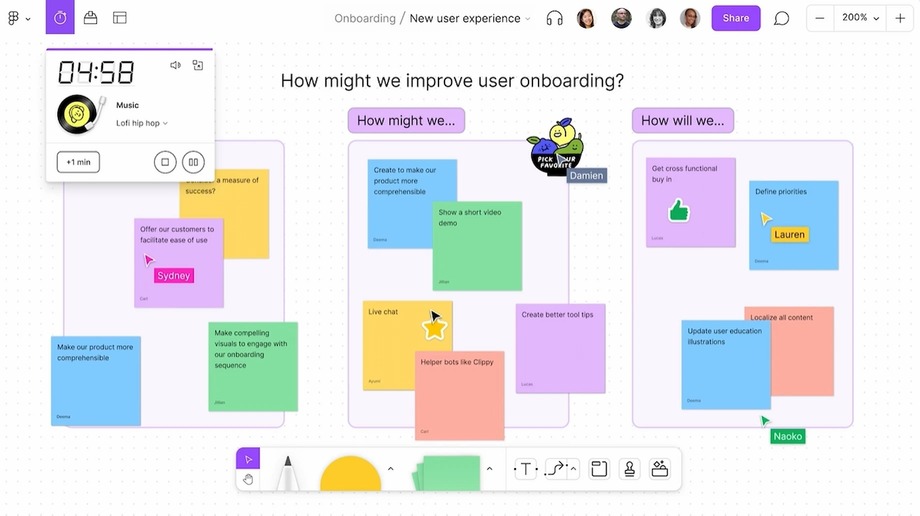
FigJam features
- Team access
- Customisable templates
- Projects timelines
- Integrations with Asana, Jira, and Github
- Planning widgets
- Included with all paid Figma plans
- Free version includes 3 FigJam files and unlimited collaborators
Mural
 Mural is a flexible tool for brainstorming. This mind map software enhances the ability to create a safe space for collaborations. The app offers scheduling features to allow managers to set task timers, invite users, provide role-based access to specific sections, lock down content, and run surveys to ensure the timely completion of projects. Using Mural, your meetings are becoming more engaging and inclusive, and ultimately, diverse perspectives lead to more innovative, impactful solutions.
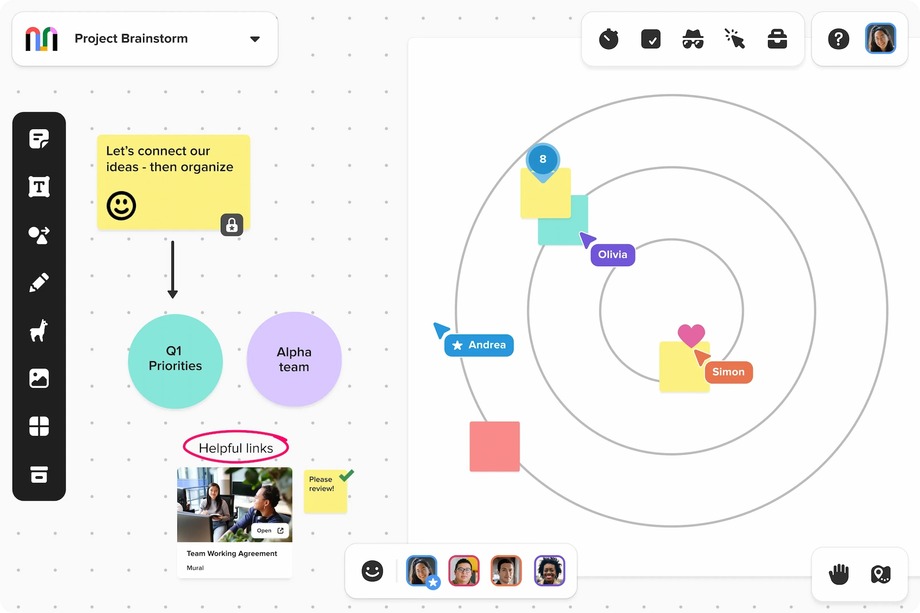
Mural features
- Flexible permissions
- Easy-to-use templates
- Mapping and diagramming
- Timer
- Free version includes 3 murals and unlimited members
XMind
 XMind is a powerful mind map tool. It is a multi-platform cloud-based mind mapping solution that goes where you need it. This is perfect if your organization utilizes several different platforms as part of their technology. It’s also one of the best pieces of mind mapping software for Mac. Recent updates have introduced AI-powered features like Pitch Video (which turns mind maps into presentation videos), real-time collaboration, and enhanced project management with Gantt charts.
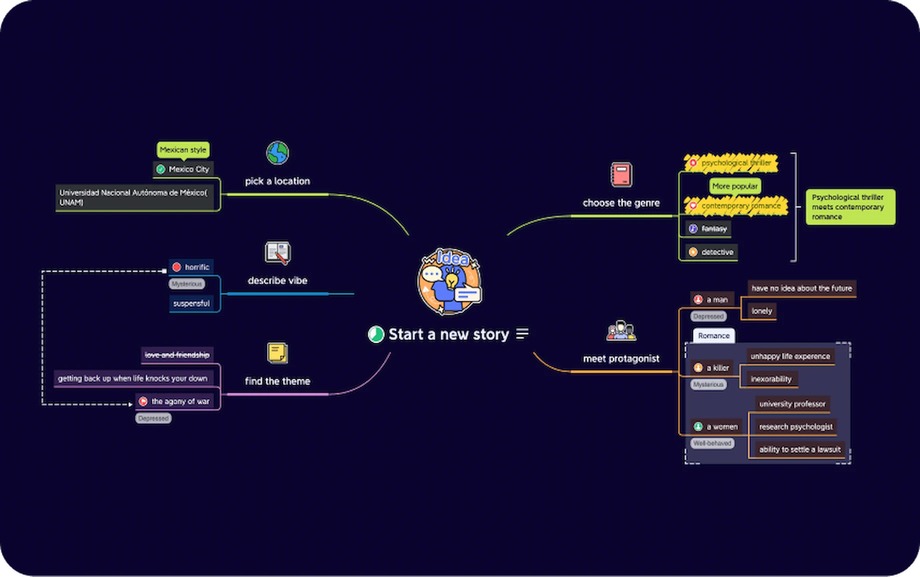
Xmind features
Cloud-based multiplatform support
Stunning visualizations
AI-powered Pitch Video and sticker generation
Real-time collaboration with task assignees and dependencies
Multiple chart styles including:
- Mindmap
- Logic Chart
- Org Chart
- Timeline
- Fishbone
- Matrix
- Gantt Chart
Pricing plans for 6-months and 12-months.
Mind Meister
 Mindmeister is an entirely web-based mind mapping solution. This mind mapping tool allows collaboration in every environment—whether on a mobile or desktop platform. It now includes AI-powered idea generation that helps expand topics and suggest new branches automatically. Mindmeister is among the best mind mapping software currently on the market.
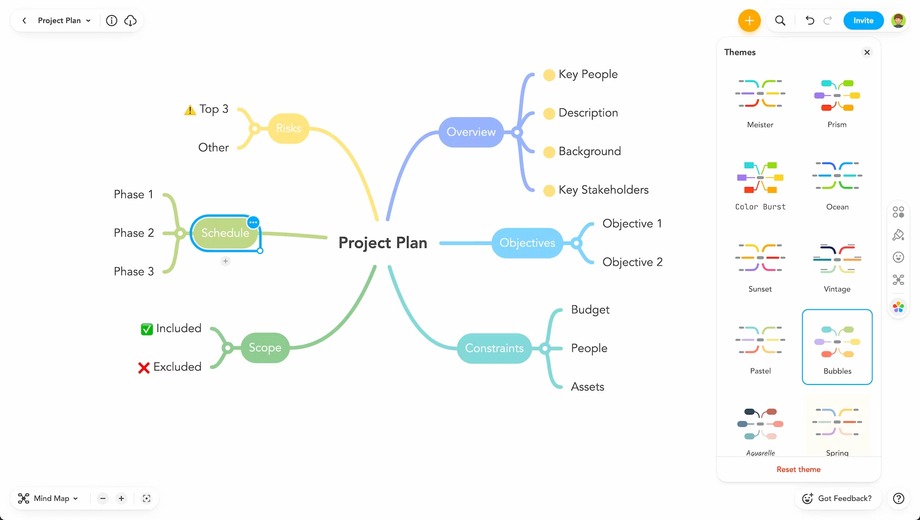
Mind Meister features
Cloud-based multiplatform support
Streamlined project management
Perfect for a variety of uses such as:
- Brainstorming
- Note Taking
- Planning
- Meeting Management
- Idea Management
- Matrix
Free option supports up to 3 mind maps.
Miro
 Miro is a very advanced piece of mind map software. This platform is used by big-name companies such as Spotify, Netflix, and Dell, and serves 95% of Fortune 100 companies. Miro has evolved into what it calls "The AI Innovation Workspace," adding AI-powered features like board summaries, multi-step AI workflows, and automatic translation across 18 languages. The best part about Miro is the platform is free and doesn’t require the user to enter a credit card. Later, users can upgrade to a paid account for more features.
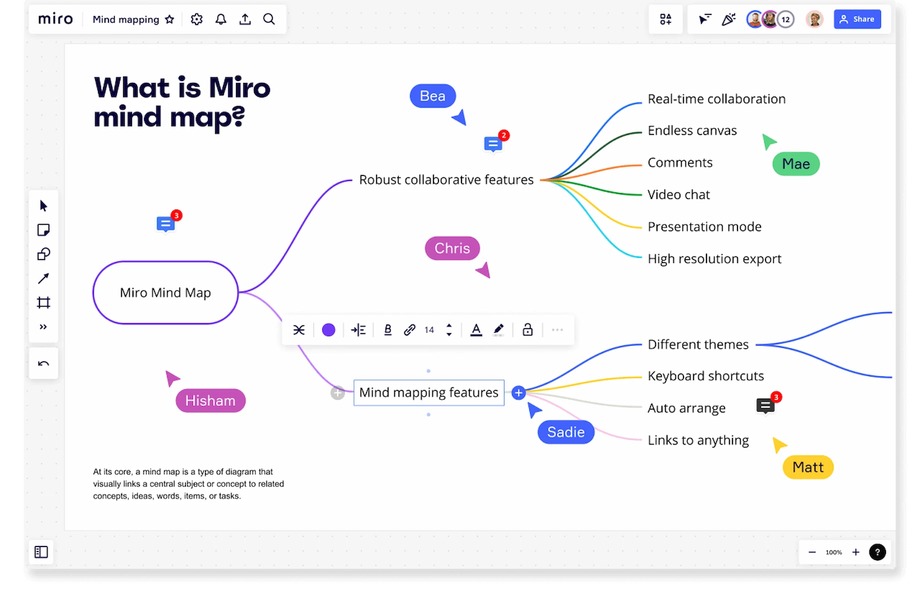
Miro features
- Realtime collaboration
- Powerful collaboration tools
- Support for hotkeys
- Presentation mode
- Bountiful design choices
- AI-powered summaries, workflows, and board translation
- Free version includes 3 editable boards.
Mindmup
 Mindmup is unique among all previously mentioned mind mapping software because of the unlimited number of mind maps that come with its free account. The one drawback of this platform is the free version only allows mind maps to be saved for a maximum of six months or 100 KB. Despite this limitation, it’s powerful feature-set places it among the best mind mapping tools.
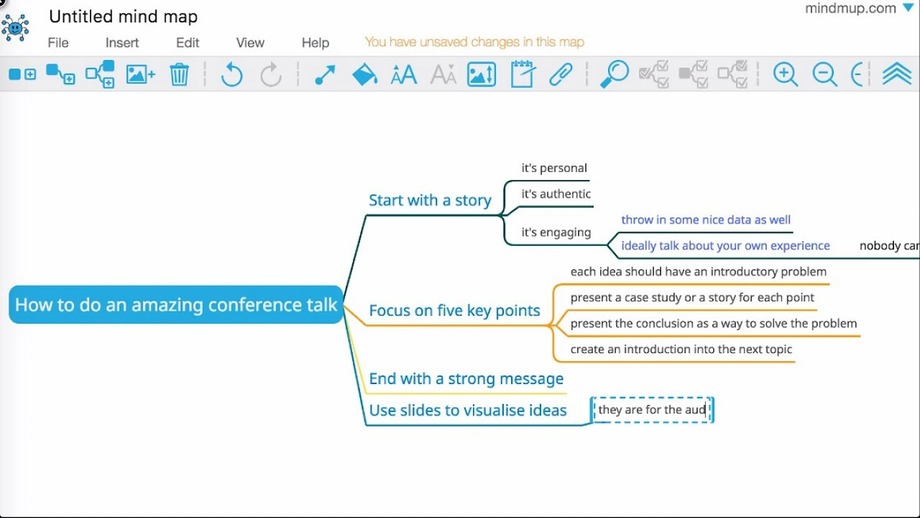
Mindmup features
- Clever user-interface
- Save to your Google Drive
- Create storyboards
- Social media integration
- Project management
- Free version includes unlimited boards.
Coggle.it
 Coggle bills itself as the best way to share intricate ideas out of all mind mapping tools. It has a robust feature set that allows for visually appealing customizations. There are also three pricing options available, which are all very affordable compared to other mind mapping software. The free plan features three private diagrams and unlimited public diagrams. You’ll also get unlimited uploads and a huge icon set.
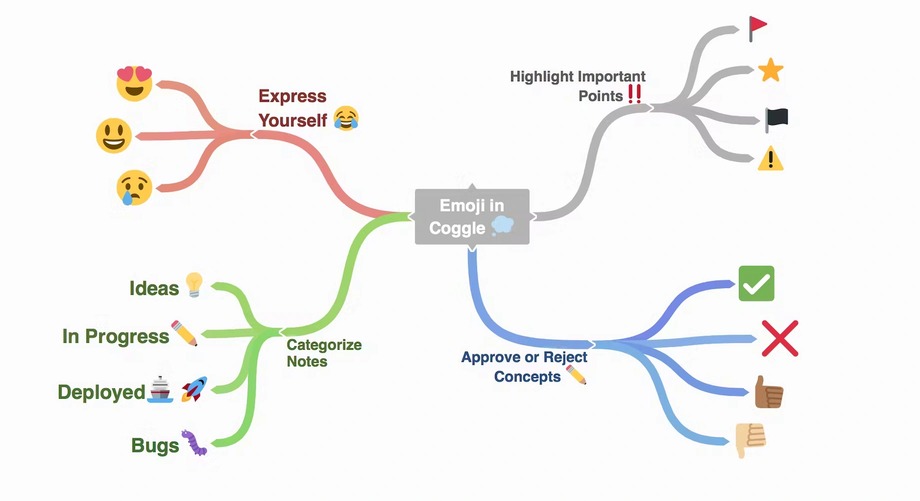
Coggle.it features
- 1600 quality icons for use in your mind maps
- Unlimited image uploads
- PDF & Image downloads
- Innovative branch visualizations
- Automatic change saving
- Free version includes 3 private diagrams and unlimited public diagrams.
Whimsical
Whimsical is a fast, clean visual workspace that has gained a strong following among product teams and designers. What sets it apart from other mind mapping software is its AI integration — you can generate mind maps, flowcharts, and sequence diagrams from a simple text prompt. Just describe what you need, and Whimsical builds the structure for you. It's especially useful when you need to go from a rough idea to a polished diagram quickly, without fussing over layout and formatting.
Whimsical features
- AI-generated mind maps from text prompts
- Flowcharts, wireframes, and docs in one workspace
- Clean, distraction-free interface
- Real-time collaboration
- Free version includes limited boards and AI generations.
Mapify
Mapify is an AI-first mind mapping tool built by the team behind XMind. Instead of building maps from scratch, Mapify lets you turn existing content — YouTube videos, PDFs, articles, web pages, and even audio — into structured mind maps. This makes it especially useful for students and researchers who want to quickly digest and organize large amounts of information. It's available as a Chrome extension and a mobile app, so you can map content on the go.
Mapify features
- AI-powered conversion of videos, PDFs, articles, and audio into mind maps
- Chrome extension for instant mapping while browsing
- Mobile app for on-the-go use
- Export and sharing options
- Plans starting at $5.99/month.
How to Pick a Mind Map Tool
To pick the best mind mapping tool for your unique situation, there are a few factors that should be considered. Depending on your individual needs, you may find that some software lacks a few essential items that are critical for your purposes. Here are the major factors that should play into your decision.
Check mind-map software
Look beyond the marketing and make sure that the mind-map app is designed specifically for brainstorming. The ideal app should be intuitive and allow you to create nodes and connect ideas without thinking about the software. It should offer an unlimited canvas size, so you can map out as many ideas as you need, and allow you to attach files to fully illustrate concepts. Finally, the mind map tool should allow you to save, edit, and export your maps in different formats to share with others.
Team access
If you are working on a project that requires multiple team members to access mind maps and edit them simultaneously, you’ll need to consider this. Some mind map software does not allow for real-time editing, although it’s supported in most. If you need this feature, then consider Miro or Coggle.
More than mind maps
If you plan on doing more than just mind-mapping for your project, you’ll need to keep this in mind when brainstorming software. While all of the aforementioned software is excellent for mind mapping, some options stand out and are exemplary for other tasks and different diagram types. Mind Meister and Coggle allow for unparalleled customization of charts.
Integrations
If you intend to integrate your mind maps into social media or utilize existing technologies—such as Google Drive or Microsoft 365—you’ll need to make sure it’s supported with the mind mapping software you choose. Two excellent options for this are Mindmup and Miro.
AI capabilities
Many mind mapping tools now include AI features that can save you significant time. Some, like Whimsical and Mapify, can generate entire mind maps from a text prompt or existing content. Others, like Miro and MindMeister, use AI to suggest ideas, summarize boards, or expand on topics. If speed and idea generation matter to you, consider how well the AI features match your workflow.
Supported platforms
You’ll also need to consider which platforms are supported by each type of mind map tool. If your organization is primarily Apple-based, you’ll need to select mind mapping software compatible with Mac. Your best bet is to choose an option that is cloud-based so it works across all platforms and devices.
Budget
Your last consideration will be your budget for mind mapping software. If you have a complex set of projects that need many detailed diagrams, you’ll need to make sure that you select a software option that fits with your budget and allows you the mind maps you need.
Find Your Mind Map Tool
In conclusion, there are many different types of mind map software available that fit a variety of needs. There is no one-size-fits-all solution, so it’s best to make a list of your needs, and then start shopping to find the mind mapping software for you. A great place to start would be to select a few of the options that offer free plans, and start creating a mind map focused on selecting the best mind mapping software. This will give you a real-world view of the features so you can select the software solution that’s right for you.


